
Available now
Hospitality Zendesk theme for guest support, destination guidance, and branded self-service.
HospiStay Hospitality Pro 2.1.0 is a Zendesk theme for hospitality brands that need clearer guest guidance, stronger self-service, and branded support journeys from booking questions to on-property help.
What this theme is designed to do.
- Turn the help center homepage into a guest guidance hub, not just a branded search box.
- Route common guest questions into clearer paths for booking, arrival, rooms, experiences, policies, FAQs, and contact.
- Support a hospitality brand with stronger structure, cleaner self-service, and a more maintainable Zendesk theme layer.
Release qualityWhat is included in the current hospitality edition.
The hospitality edition is aligned across the manifest, templates, CSS, JavaScript, and document metadata.
It keeps a rich hospitality control surface while staying within Zendesk’s theme-setting limits.
Dropdown, filter, and navigation toggle buttons were hardened with explicit button types.
Static QC found no unresolved settings.* references in templates, CSS, or JavaScript.
No broken settings.settings-* style access patterns were found in the scan.
The import package stays within Zendesk’s filename limit for theme upload.
Guest journey architectureWhat the hospitality homepage is designed to route people into.
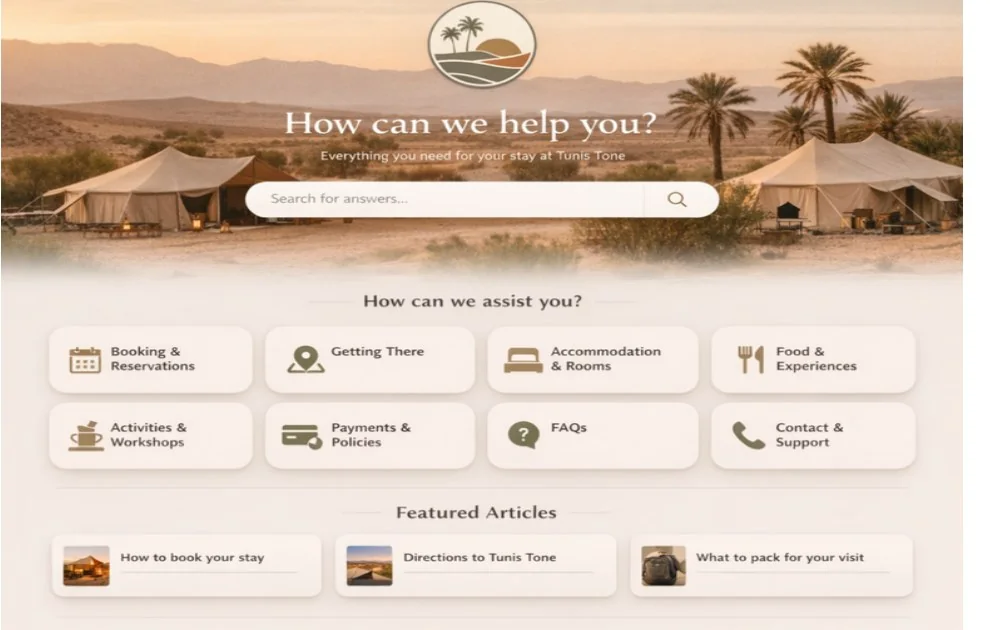
The previewed homepage is not just decorative hospitality branding. It acts as a structured starting point for the most common guest questions before, during, and around the stay.
BR
Stay
Booking & reservations
Reservation basics, amendment questions, booking guidance, and pre-arrival planning.
GT
Arrival
Getting there
Directions, transfer notes, property access, check-in timing, and arrival logistics.
RM
Rooms
Accommodation & rooms
Room details, stay expectations, amenities, and property-specific information.
FX
Experience
Food & experiences
Dining, excursions, experience-led support, and guest planning around the property.
AW
Activities
Activities & workshops
Scheduled experiences, availability guidance, preparation details, and add-on support.
PP
Policies
Payments & policies
Payment explanations, cancellation logic, policy visibility, and guest reassurance.
FAQ
Knowledge
FAQs
Quick-answer coverage for repeat guest questions that should never require a ticket.
CS
Support
Contact & support
A cleaner escalation path when self-service is not enough and the guest needs a live route.
The preview also surfaces featured articles directly on the homepage, which is useful for high-value pre-arrival content like “How to book your stay,” directions, packing guidance, or other stay-preparation content that reduces repetitive contact.
What the theme includesHospitality structure, not just hospitality styling.
Journey-specific landing pages
- contact_options for clearer support routing and channel choice.
- journey_hub for structured guest guidance and curated entry points.
- policy_hub for policy-heavy hospitality questions that need clarity.
Alternate layouts already retained
- Article templates: concierge, docs_longform, faq, policy, trust_center.
- Section templates: concierge, docs, faq, trust.
- Category templates: concierge, docs, faq, trust.
Important Zendesk wiring stays in place
- The quick-answer / generative search helper remains in
search_results.hbs. new_request_page.hbskeeps thenew_request_formwiring intact.- The hospitality edition keeps the structure that makes guest support clear while staying ready for brand-specific adaptation.
Import readinessWhat was hardened in the current release.
VA
Version
Version alignment
The package was bumped to 2.1.0 and aligned across manifest, CSS, JavaScript, template comments, and document_head metadata.
IS
Import
Import safety retained
The earlier patched dynamic-content manifest identifiers were preserved so the missing-settings import failure does not return.
AC
Access
Interactive control hardening
Explicit button types were added to dropdown, filter, and navigation controls to prevent accidental form submission behavior.
AX
A11y
Accessibility pass
An explicit aria-label was added to the mobile user navigation container for clearer semantics.
PK
Package
Zendesk-ready packaging
The theme was packaged as a standalone import ZIP to keep deployment simpler and more reliable.
HC
Hospitality
Hospitality structure preserved
The edition keeps the hospitality IA, guest-facing copy model, journey pages, and article-support treatment together as one focused hospitality offering.
Implementation approachHow CRM Scene would roll this into a live help center.
Step 1
Import and preview the hospitality build
Upload the standalone ZIP into Zendesk, preview it first, and verify that the hero, featured guides, experience cards, and support panels render as expected.
Step 2
Review the settings surface deliberately
Review header links, hero copy, featured guides, experiences, article support, footer, social links, and design tokens carefully before launch.
Step 3
Assign templates only where they fit
Map the hospitality-specific article, section, category, and custom page templates to the right parts of the IA. Leave the wrong ones unassigned.
Step 4
Validate search, request flow, and live channels
Before publish, test generative search behavior, request-form wiring, service-catalog entry points if used, and the contact or WhatsApp path on article pages.
Implementation optionsWays to deploy the hospitality theme in a real support environment.
Hospitality Help Center rollout
Theme setup, IA mapping, request forms, content workbook, launch QA, and governance setup for a live hospitality support environment.
Property-specific or group-specific customization
CRM Scene can reshape the guest routes, navigation, content tone, and support surfaces around a hotel, resort, retreat, villa, or destination brand.
Post-launch updates and knowledge operations
After go-live, the value shifts to regression QA, content hygiene, analytics review, feature adoption, and controlled changes instead of unmanaged drift.
Brand fit
Made for hospitality teams that need clarity before and during the stay.
The theme is a strong fit for hotels, resorts, retreats, villas, serviced stays, and destination brands that want a branded help center without burying guests in generic categories.
It works especially well when guest questions cluster around booking changes, arrival planning, room details, experiences, payments, policies, and live contact choices.
CRM Scene can adapt the navigation, templates, content structure, and support paths to match a single property, a hospitality group, or a destination-led brand.
Extension options
Adapt the release to your operating model.
The hospitality release can be reshaped around guest journeys, direct-contact choices, trust content, and multilingual content operations without losing the structure that makes the theme easy to manage.
Planning a hospitality help center rollout?
CRM Scene can adapt the theme to your property or brand, reshape the information architecture around guest journeys, and prepare it for a cleaner launch.