Scattered request intake
Email, WhatsApp, forms, portals, spreadsheets, and direct messages compete for attention with no single owner.
CRM Scene connects business objectives, operating-model design, digital platforms, data, automation, and AI so transformation changes how work gets done—not just which tools are installed.
Teams usually arrive with symptoms: requests come from everywhere, follow-ups live in chat, managers cannot see bottlenecks, and automation makes inconsistent processes move faster. CRM Scene turns that into a design problem before it becomes a tooling decision.
Email, WhatsApp, forms, portals, spreadsheets, and direct messages compete for attention with no single owner.
Teams cannot tell what is new, waiting, approved, blocked, escalated, resolved, or ready for customer communication.
Support, sales, finance, identity, and product systems each hold part of the truth, but the workflow needs one usable context.
Leaders see lagging numbers but not why work slowed, who owns the exception, or what changed in production.
Map intake channels, handoffs, approvals, data needs, exceptions, failure points, and stakeholder ownership.
Define queues, roles, states, SLAs, escalation paths, governance gates, reporting needs, and acceptance criteria.
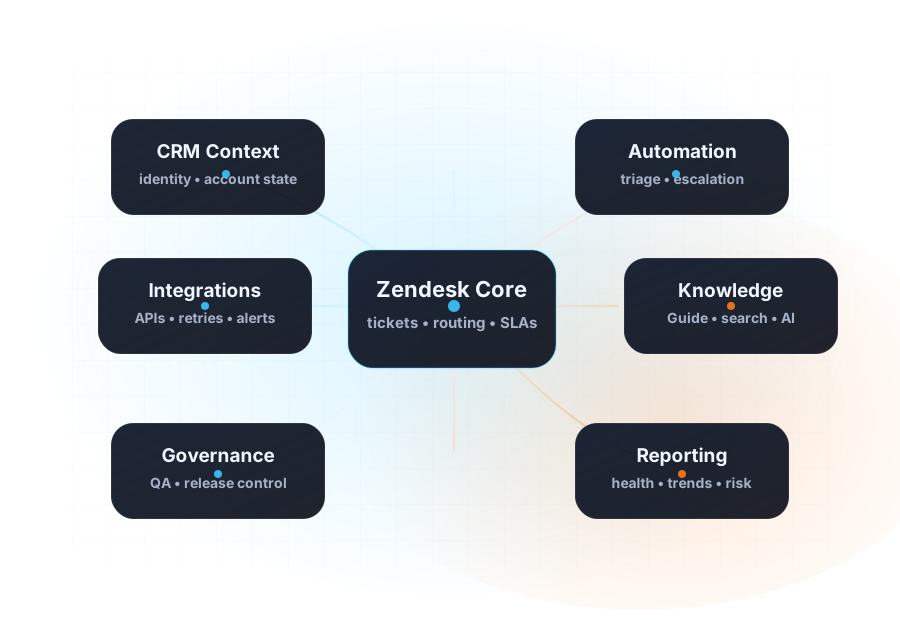
Configure Zendesk, CRM context, forms, automations, integrations, knowledge, dashboards, and internal controls around the model.
Launch with QA, documentation, training, incident routes, analytics review, and a repeatable optimization cadence.
Portals, forms, email routes, ticket types, service catalogs, triage rules, and ownership models.
Operational states, escalation paths, approvals, review queues, exception handling, and safe fallbacks.
API workflows, event-driven sync, controlled data exposure, retries, alerts, and ownership boundaries.
Help centers, internal playbooks, article governance, multilingual content, and AI-ready retrieval structure.
Metrics, queue health, throughput, quality signals, backlog movement, and leadership reporting cadence.
Zendesk Suite, Guide, automations, triggers, permissions, themes, integrations, and managed optimization.
Where requests enter, who touches them, which systems matter, and where work gets delayed or duplicated.
The future workflow, roles, data dependencies, tool layer, implementation phases, and governance model.
What to fix first, what can wait, what must be staged, and how to measure whether the work is improving operations.
Use the free five-minute assessment to score the knowledge, systems, handoffs, governance, measurement, and AgentOps controls the transformation will depend on.