I use GoDaddy for my business
Continue to CRM Scene's existing customer-facing Website-to-CX service paths.
See the customer service pathsCRM Scene helps businesses turn their website and digital presence into a connected customer experience system with Zendesk, CRM workflows, help centers, automation, reporting, integrations, and AI readiness.

Continue to CRM Scene's existing customer-facing Website-to-CX service paths.
See the customer service pathsCheck a customer's customer-operations fit, choose an engagement model, or send a consent-aware referral brief.
Open the agency-partner programContact forms, email aliases, chat, quote requests, and support questions need routing logic, ownership, priorities, and escalation paths.
CRM Scene can design field mapping, source tags, triggers, views, SLA ownership, and reporting around the website support path.
Lead requests, service issues, onboarding questions, and urgent complaints should not all fall into the same unstructured queue.
Customers need accurate answers, agents need reusable knowledge, and AI tools need clean source material before automation can be trusted.
If source, intent, urgency, service line, and owner are not captured early, the business cannot learn from customer demand.
Clean domain routing, redirects, SSL checks, analytics signals, confirmation messages, and recovery notes make the operational system easier to run.
For businesses with a website but no clean customer intake, support handoff, CRM routing, or reporting model.
Plan launch →For teams that need clarity before build: what is broken, what is risky, and what should be fixed first.
Start audit →For companies that need website inquiries, email, support forms, help center escalation, and reporting structured in Zendesk.
Plan setup →For businesses preparing for self-service, safer AI answers, chatbot containment, or more consistent agent replies.
Build knowledge layer →The review is meant to produce practical next moves, not a generic website critique. CRM Scene can turn the findings into scoped implementation work across support intake, CRM handoff, reporting, knowledge, and governance.
Form fields, inquiry categories, confirmation messages, source tags, routing rules, ownership, and escalation signals.
Ticket forms, triggers, views, SLAs, email channels, help center escalation, and reporting that reflects website demand.
Open Zendesk partner page →Lead source logic, opportunity or case creation, owner assignment, follow-up rules, and management visibility.
Source, intent, urgency, service line, channel, and owner data captured early enough to make reporting useful.
Search paths, article templates, support deflection loops, content ownership, and gaps that block customer self-service.
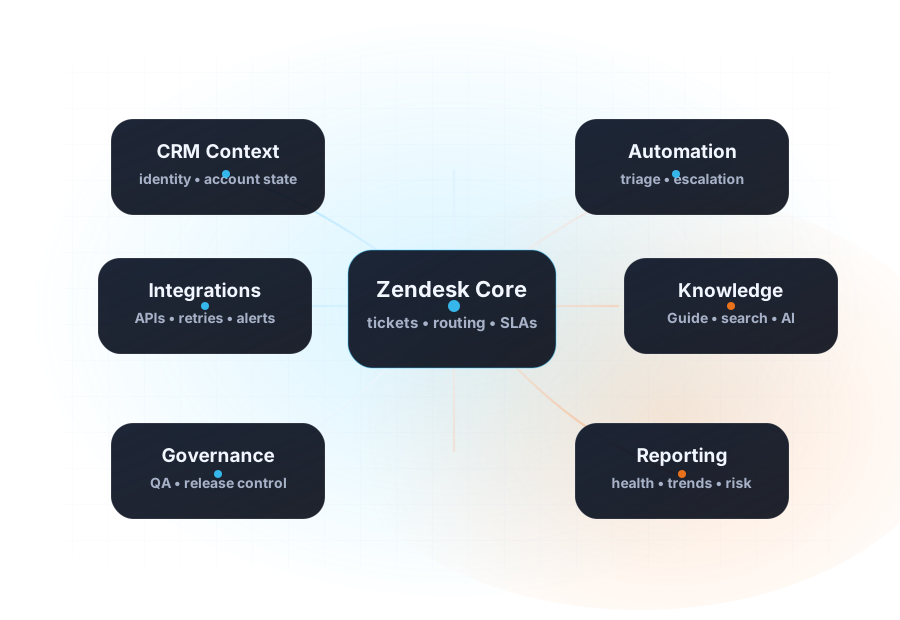
Clean knowledge, safer intent labels, reliable routing, and operational controls before automation gets more ambitious.
Customers start from forms, quote paths, email links, chat, booking flows, or support entry points.
Fields, categories, source tags, urgency, consent, and ownership are captured before the request drifts.
The right system receives the request with routing, SLA, owner, customer context, and follow-up rules.
Teams see demand patterns and maintain help center material that reduces repeat handling.
Automation can use cleaner data, governed content, and safer escalation paths.
Start with a Website-to-CX Review, then decide whether the next move is Zendesk setup, CRM handoff, reporting cleanup, help center structure, or a broader operating model project.
Use the agency-partner path to check fit and agree the customer-contact model before making an introduction.
A website form creates email noise, but no one can see source, priority, promised follow-up, or whether the request became revenue.
Customers use the website for help, but requests land in inboxes, social DMs, or sales queues before Zendesk sees them.
A new site or campaign increases demand, but routing, reporting, knowledge, and automation are not ready for the volume.
Field mapping, source tags, priority logic, confirmation messages, routing triggers, views, and SLA ownership.
Lead source tracking, service interest, owner assignment, follow-up rules, and handoff reporting.
Search-first support paths, article templates, contact escalation, top issue tracking, and knowledge feedback loops.
DNS and SSL checks, redirect maps, canonical URL rules, analytics, support source tracking, and operational recovery notes.
Inquiry forms, quote requests, service follow-ups, missed calls, and email routing become a tracked customer workflow.
Order questions, returns, delivery issues, product inquiries, and help center content are structured into faster support paths.
Website requests, booking questions, intake categories, escalation rules, and customer communication paths become clearer.
Demo requests, support tickets, onboarding needs, product questions, and account context route with cleaner ownership.
Map the website journey, intake points, channels, systems, reporting gaps, and current operational risk.
Define forms, fields, categories, owners, routing rules, escalation paths, knowledge structure, and success criteria.
Configure Zendesk, CRM handoff, help center paths, automations, integrations, tracking, and operational documentation.
Review reports, tune workflows, improve knowledge, reduce manual handling, and prepare the system for AI safely.
CRM Scene is a GoDaddy Recommended Agency Partner. CRM Scene is responsible for its own services, pricing, proposals, and delivery.
No. It extends the front door of the customer journey. CRM Scene still brings Zendesk, CRM architecture, support workflows, help centers, reporting, automation, and governance into the system.
Yes. CRM Scene can review the website and the operational paths around it, including forms, redirects, DNS and SSL hygiene, analytics signals, support entry points, and how inquiries flow into Zendesk or CRM systems.
Bring the website URL, current contact paths, support inbox or Zendesk setup, CRM handoff details, reporting gaps, and examples of customer requests that get delayed or lost.
Share what happens after customers submit forms, ask for help, request quotes, book appointments, or contact your team. CRM Scene will map the cleanest first move.