CRM
Foundation
Customer-service CRM architecture
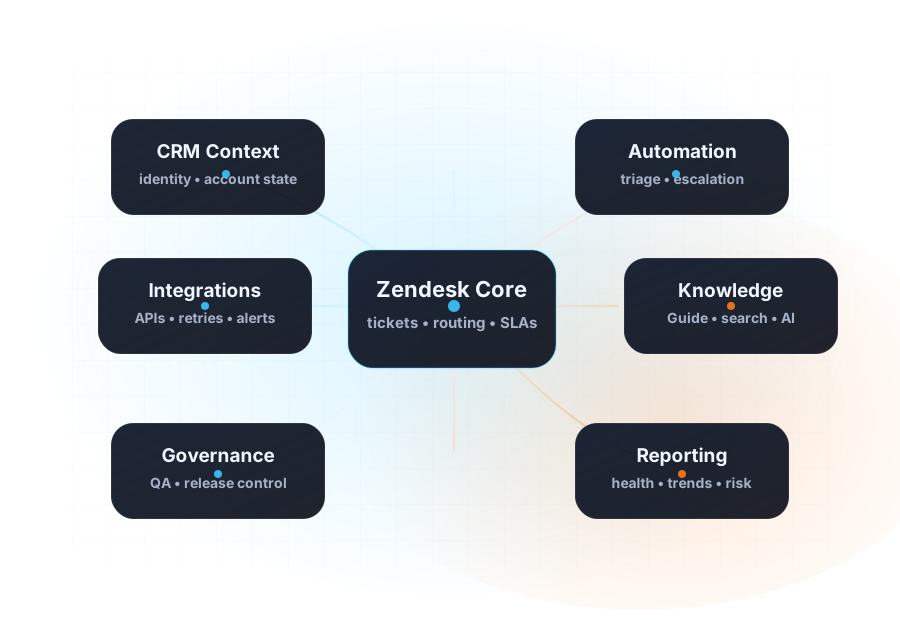
Brands, channels, groups, roles, permissions, customer context, and admin ownership are designed around the way support actually operates.
Plan, configure, migrate, integrate, and launch Zendesk as the customer-service layer in your customer stack—with clear ownership, governed workflows, measurable QA, and a team-ready handoff.
Brands, channels, groups, roles, permissions, customer context, and admin ownership are designed around the way support actually operates.
Fields, forms, views, macros, triggers, automations, escalation paths, and service levels are built as one coherent operating model.
Connect Zendesk to sales CRM, ERP, billing, ecommerce, identity, analytics, and internal tools with owned data contracts and failure paths.
Guide structure, taxonomy, permissions, multilingual workflows, review cadence, and search readiness are included when knowledge is in scope.
Operational measures, naming rules, change controls, release gates, and documentation make the Zendesk environment easier to govern after launch.
Acceptance criteria, test cases, launch sequencing, rollback assumptions, admin enablement, and stabilization turn configuration into a support-safe release.
Teams know they need Zendesk, yet queue ownership, escalation paths, service levels, permissions, reporting, and acceptance criteria are still being decided inside configuration meetings. A consultant turns those decisions into a buildable model before launch pressure hardens weak assumptions.
Support depends on sales CRM, billing, ecommerce, identity, product, or internal-system data, but handoffs are manual or unreliable. Implementation should treat customer context, integration ownership, failure behavior, and fallback paths as core scope—not an afterthought.
Triggers overlap, forms drift, views become personal workarounds, reporting no longer answers operational questions, and every release feels risky. A governed rebuild separates quick wins from structural work and gives the team a safer sequence for improvement.
For teams moving into Zendesk or launching a new brand, region, or support operation.
For environments where years of change created duplicate rules, weak reporting, and unclear ownership.
For teams replacing another support platform or connecting Zendesk to the wider customer stack.
Confirm business outcomes, support journeys, system dependencies, data constraints, owners, and current-state risk.
Define the data model, channels, queue structure, roles, routing, service levels, integrations, and acceptance criteria.
Configure Zendesk, implement workflows, connect business systems, document decisions, and prepare test evidence.
Run scenario-based QA, reconcile migrated data, train owners, stage the release, and monitor the launch window.
Resolve edge cases, review adoption and performance signals, complete the handoff, and prioritize the next optimization cycle.
A sanitized fintech case shows how intake paths, admin ownership, routing logic, audit trails, and release controls can be redesigned together.
Read the operations case →A representative integration case covers data contracts, monitoring, retries, runbooks, and clearer ownership across connected customer systems.
Read the integration case →Implementation work can extend into help-center structure, publishing ownership, multilingual review, and more dependable customer search.
Read the knowledge case →Explore Zendesk themes →CRM Scene publicly references Premier Partner status, 10 Zendesk certifications, 200+ client engagements, and five-star client-rated delivery.
Verify Zendesk partner credentials →Use an audit first when the current environment is messy or the team needs a reliable roadmap before changing production.
Review the assessment scope →Review the operating-model, workflow, integration, knowledge, QA, and launch decisions that should be made before configuration starts.
Open the implementation checklist →See how data contracts, identity, retries, monitoring, and failure ownership shape reliable customer-system integrations.
Review integration services →Understand how CRM Scene frames diagnostic, implementation, migration, and ongoing optimization budgets.
Review pricing guidance →New implementation, rebuild, migration, CRM integration, new brand, new region, workflow cleanup, or a launch that needs stronger QA.
Share the target date, brands, channels, languages, systems, data, approvals, internal owners, and the risks already visible to the team.
CRM Scene will help frame the right assessment, implementation phase, delivery dependencies, and budget path before the build starts.