OP
Operating rhythm
A clear monthly or sprint cadence
Teams should know when requests are reviewed, how work is prioritized, and what qualifies as urgent.
Managed services should not mean “someone tweaks Zendesk when asked.” The strongest managed model gives teams an operating rhythm for maintenance, release review, reporting, knowledge upkeep, and the small decisions that keep support systems healthy after launch.
Published for support leaders, operators, and admins evaluating support-system upgrades.
Reviewed for delivery realism, operational risk, and search-language clarity before publication.
Use this guide to clarify scope, identify hidden risk, and plan a cleaner next step before implementation.
After implementation, most support teams face the same problem: nobody owns the small operational decisions that compound into drift. Forms multiply, automations overlap, knowledge goes stale, and reporting never quite catches up.
A good managed service creates a predictable rhythm for reviewing these issues before they become incidents. It gives the team a way to prioritize change without letting every request become production debt.
Teams should know when requests are reviewed, how work is prioritized, and what qualifies as urgent.
Workflow improvements should move through review, QA, and post-release checks—not ship informally whenever someone is free.
The output should not be a backlog alone. It should include system signals, recurring issues, and recommended next steps.
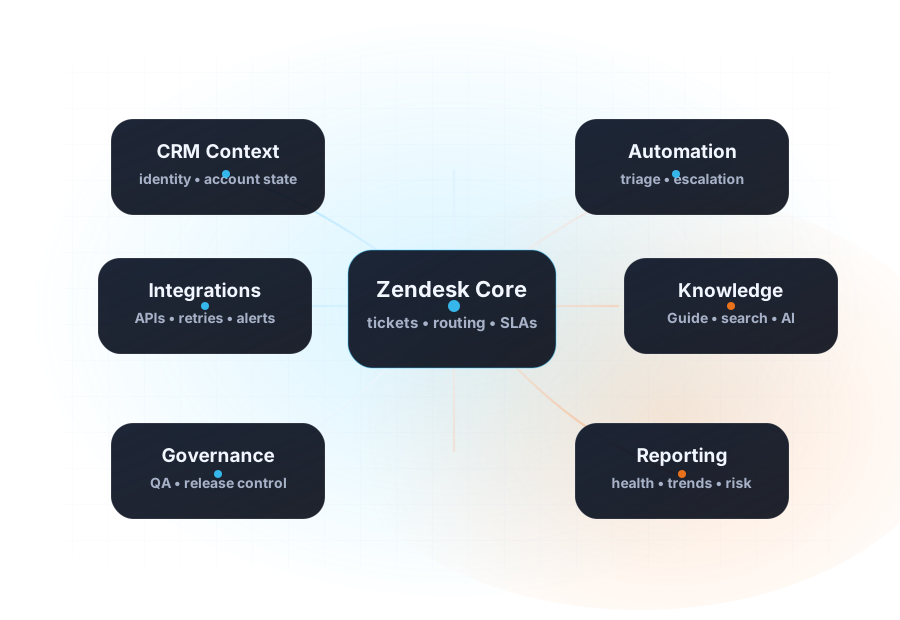
Post-launch optimization often touches Zendesk administration, automation quality, permission hygiene, help-center updates, reporting logic, and sometimes integrations or theme upkeep.
That is why the model works best when the managed partner can see the whole support system, not only the ticket forms.
See how CRM Scene scopes recurring improvement work for support systems that need steady care.
Open managed services →Use a framework for monthly reviews, backlog control, and release readiness.
Open playbook →Read a public case page about stabilizing and improving a high-volume support operation over time.
Open case study →